


SissWrap Hand.
Made simple.
Your guide to getting started, finding the controls, and caring for your red light hand wrap.
SissWrap Hand · Manual v6 · Updated October 27, 2026
View product →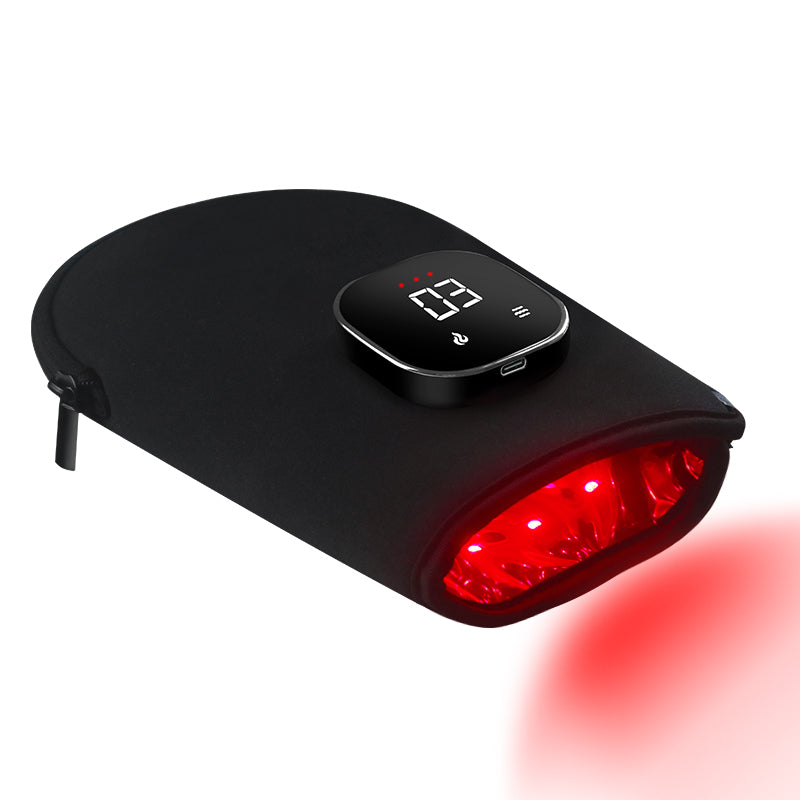
Three steps to settle in.
Read the safety information and complete the first-use sensitivity check before beginning your routine.
Place your hand inside the wrap.
Place your hand inside the wrap with the light-emitting surface facing the treatment area. Adjust the fit comfortably, without causing pain, numbness or restricting circulation.
Press and hold to begin.
Hold the side power button. One beep confirms startup. The default is Low mode with a 10-minute timer.
Choose your mode and timer.
Use the flame button for modes and the wave button for the timer. First-time users should stop manually after 5 minutes.
New to your wrap? Follow the gradual-start schedule rather than running the full timer straight away. Read safety information →
Five modes. One flame button.
Press the flame button to cycle through the five modes. Select a mode below to explore the controls.
Low
The default mode when you turn on SissWrap Hand. The device also starts with a 10-minute timer.
Medium
Select mode 2 using the flame button. Choose your session duration separately with the wave button.
High
Select mode 3 using the flame button. Higher settings do not change the 20-minute maximum per area, per session.
10 Hz Pulse
Select mode 4 for the 10 Hz pulse setting. Your session timer is selected separately.
Breathing
Select mode 5 for Breathing mode. The same gradual-start guidance and session limit still apply.
Two more controls: The wave button selects a 10- or 20-minute timer. Briefly press the power button during operation to lock the screen. After 10 seconds without operation, the screen returns to the current mode.
Start short. Increase gradually.
SissWrap Hand has 10- and 20-minute timers. Your first sessions are shorter: stop manually at the recommended time.
Per area, per session. Stop manually before the timer ends.
Increase only if you have had no adverse reaction.
Progress gradually while use remains comfortable. Maximum 20 minutes per area in one session.
Before your first session: sensitivity check
Turn on the device and apply it to a small area of your forearm for 3 minutes. Remove it and check your skin. If redness lasts longer than 2 hours, discontinue use and seek advice before using it again. Stop immediately if you experience discomfort. Passing this check does not override the safety restrictions.
Longer sessions are not necessarily more beneficial. Do not continue through discomfort or exceed the recommended limit.
Ready for the next session.
A few simple care habits help you keep your wrap ready to use.
Battery & charging
- 5 beeps + rapid flashing
The battery is low. - Slowly flashing indicator
The battery is charging. - Solid indicator
The battery is fully charged. - Unplug before your session
The wrap will not operate while charging.
Cleaning & storage
- Disconnect and cool
Disconnect power and allow the device to cool before cleaning. - Clean the LEDs monthly
Use rubbing alcohol and a cotton cloth. Allow the alcohol to dry completely before use. - Keep it dry
Do not immerse in water or wash electrical parts. Keep charging components dry. - Handle gently
Do not sharply fold, crease or stand on the wrap. Keep it away from hot surfaces.
A little clarity.
Quick answers for using SissWrap Hand.
Can I use SissWrap Hand while charging?
No. SissWrap Hand will not operate while charging. Disconnect it from the charging cable before use.
How long should I use it?
Start with 5 minutes per area for the first 3 days. If there is no adverse reaction, increase to 10 minutes for the next 3 days. Then progress to 15 minutes and, subsequently, up to 20 minutes if comfortable. Do not exceed 20 minutes per area in one session.
Is it normal for the wrap to feel warm?
Some warmth may occur during use. Stop immediately if you feel burning, pain or discomfort. Seek medical advice if symptoms persist.
Why does the display return to the mode number?
After 10 seconds without operation, the screen returns to displaying the current mode.
How do I lock the screen?
Briefly press the power button while the device is operating to lock the screen.
Use with care.
The following guidance applies to SissWrap Hand. Review it before your first use and whenever your health or medication changes.
Safety Information
Read these instructions before your first use. Use the device only on the body areas described in this manual.
When Not to Use
Do not use this device:
• During pregnancy.
• If you have a pacemaker, implanted defibrillator, or another implanted electronic device.
• If you have a known malignant or metastatic tumor.
• If you have a known light sensitivity or take medication that causes sensitivity to light.
• During a high fever, active tuberculosis, or an acute soft-tissue infection.
• If you have a bleeding disorder or tendency to bleed, a serious circulation disorder, or an occlusive vascular condition.
• On areas with numbness, reduced sensation, or a skin allergy.
• On open wounds or actively bleeding skin.
• On an acute injury within the first 72 hours.
• While sleeping, intoxicated, or unable to notice and respond to discomfort.
Do not use on infants or allow children to operate the device.
Check Before Use
Consult a healthcare professional before use if you have a suspicious skin lesion, an eye condition, or are unsure whether a medical condition or medication makes this device unsuitable for you.
This product contains neoprene. If you have a known or suspected neoprene allergy, consult a healthcare professional before use.
Do not stop or change prescribed medication to use this product.
During Use
• Keep the lights away from your eyes. Do not look directly into the LEDs.
• Ensure the wrap fits comfortably. Do not tighten it enough to cause pain, numbness, or restricted circulation.
• Do not combine use with creams, ointments, or rubs that produce heat.
• Do not cover the device with blankets or other objects during use.
• Stop immediately if you experience pain, burning, irritation, or other discomfort. Seek medical advice if symptoms persist.
• Do not exceed 20 minutes on the same area in one session.
Electrical safety and handling
Keep the device and charging components dry. Do not use with wet hands, immerse in water, or wash electrical parts. Do not use the device if it is damaged, torn, or has a damaged charging cable or connector. Do not operate it while charging. Keep away from hot surfaces. Do not sharply fold, crease, stand on, or pull the device by its cable. Disconnect power before cleaning and allow the device to cool and dry completely before using it again.
Your product, at a glance.
SissWrap Hand
In the box: LED Therapy Light Hand, USB Power Cord and User Manual.
One-year limited warranty for the original purchaser. See the manual for the complete warranty terms.
| Red / infrared LEDs | 660 nm / 850 nm |
|---|---|
| Power supply | 5 V, 2 A |
| Battery capacity | 3000 mAh |
| Timer options | 10 or 20 minutes |
| Operating temperature | 0°C to +27°C |
| Storage temperature | −30°C to +55°C |
| Relative humidity | 85% |
| LED array | 80 red LEDs (660 nm) + 80 near-infrared LEDs (850 nm) |
| Irradiance · 660 nm | 13.063 mW/cm² at 0 cm · ADCMT 8230 |
| Irradiance · 850 nm | 9.236 mW/cm² at 0 cm · ADCMT 8230 |
| Separate broadband reading | 43.3 mW/cm² at 0 cm · solar power meter; not interchangeable with ADCMT readings |
Keep the complete guide.
English user manual · Version 5 · 8 pages